
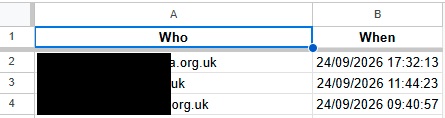

Here’s a nice bit of Google Apps Script that you can use to create a hidden access log for your Google Sheet.
Want to know when your employees last opened the sheet they are supposed to have worked on?
Here’s the solution to your problem:
// ===== CONFIGURATION =====
const LOG_SHEET_NAME = 'Access Log';

// ===== INSTALL THIS ONCE (run manually from the editor) =====
function createOpenTrigger() {
  ScriptApp.getProjectTriggers().forEach(t => {
    if (t.getHandlerFunction() === 'logAnyUserOpen') {
      ScriptApp.deleteTrigger(t);
    }
  });

  ScriptApp.newTrigger('logAnyUserOpen')
    .forSpreadsheet(SpreadsheetApp.getActive())
    .onOpen()
    .create();

  Logger.log('Installable onOpen trigger created.');
}

// ===== THIS RUNS EVERY TIME THE SHEET IS OPENED =====
function logAnyUserOpen(e) {
  const email = Session.getActiveUser().getEmail();

  if (!email) return; // can't identify this viewer, skip

  const ss = SpreadsheetApp.getActive();
  let logSheet = ss.getSheetByName(LOG_SHEET_NAME);

  if (!logSheet) {
    logSheet = ss.insertSheet(LOG_SHEET_NAME);
    logSheet.appendRow(['Email', 'Last Opened']);
  }

  const data = logSheet.getDataRange().getValues();
  let rowIndex = -1;

  for (let i = 1; i < data.length; i++) {
    if (data[i][0] === email) {
      rowIndex = i + 1;
      break;
    }
  }

  if (rowIndex > 0) {
    logSheet.getRange(rowIndex, 2).setValue(new Date());
  } else {
    logSheet.appendRow([email, new Date()]);
  }
}
Just make a tab named “Access Log” and protect it from being altered by anyone other than yourself.
Then once you’ve ran and authorised “createOpenTrigger” you can just hide that tab and you have your log quietly keeping track.
Hope this will be of use to someone, leave a comment or a like if this made your Google Search shorter!
