
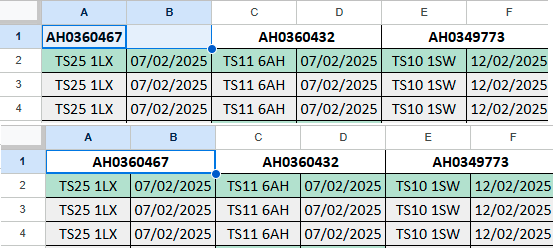

Ever have that annoying issue where you want to import a bunch of columns and then use merge so that each of the imported values has multiple columns below them?
It comes up surprisingly often for such a niche problem.
Here is a formula which will add a blank column between each value:
=split(textjoin("||",,IMPORTRANGE("[YOUR SHEET ID HERE]", "[YOUR RANGE HERE]")),"|",,false)Here is the same formula but using TRANSPOSE in order to turn the rows of a column into separated columns:
=split(textjoin("||",,TRANSPOSE(IMPORTRANGE("[YOUR SHEET ID HERE]", "[YOUR RANGE HERE]"))),"|",,false)Hope this made your Google search a bit shorter, leave a comment if this helped or you have any specific problems you need a solution to.
